
A TV box is the cheapest way to make any television fast, current and easy to use. The problem is choosing one: there are dozens on sale, the names all sound alike, and the wrong one will stutter through every 4K film you play. We ranked the five worth buying in 2026 on hardware, software support, app selection and connections, then added two cheaper options at the end.
This guide contains Amazon links. As an Amazon Associate I earn from qualifying purchases.
Quick Comparison
| Box | System | Best for | Ethernet |
|---|---|---|---|
| NVIDIA Shield TV Pro | Android TV | Power users and home theater | Yes |
| Google TV Streamer (4K) | Google TV | Most people | Yes |
| Amazon Fire TV Cube | Fire TV | Alexa homes | Yes |
| Apple TV 4K | tvOS | iPhone households | Yes |
| Roku Ultra | Roku OS | The simplest setup | Yes |
NVIDIA Shield TV Pro: Best Overall
The Shield TV Pro has been the Android box to beat for years, and nothing has replaced it. It is the most powerful of the five, it upscales HD video to 4K with AI processing, and it supports Dolby Vision and Dolby Atmos. Two USB ports and a Gigabit Ethernet port make it the pick for anyone with a hard drive full of films or a home media server.
The downside is age and price. The hardware dates from 2019 and it is the most expensive Android option here. If you only watch the big streaming apps, number two will do the same job for less.

NVIDIA Shield TV Pro
Android TV, 3GB RAM, 16GB storage, Dolby Vision and Atmos, AI 4K upscaling, 2 USB ports, Gigabit Ethernet.
I want this box →Google TV Streamer (4K): Best for Most People
This is Google's own box and the easiest one to recommend to most people. It has 32GB of storage and 4GB of memory, so the menus stay quick with plenty of apps installed. It has an Ethernet port, supports Dolby Vision and Atmos, and a button on the back of the box makes the remote ring when it is lost in the sofa.
Google TV itself is the best part: one home screen that pulls shows from all your services into a single list.

Google TV Streamer (4K)
Google TV, 4GB RAM, 32GB storage, Dolby Vision and Atmos, Ethernet port, remote finder.
I want this box →Amazon Fire TV Cube: Best With Alexa
The Cube is the fastest Fire TV device and the only box here you can control without touching the remote. Say what you want to watch from across the room and Alexa finds it. It has Wi-Fi 6E, an Ethernet port, and an HDMI input, so a cable box or game console can run through it.
Choose it if your home already runs on Alexa. The Fire TV home screen shows more advertising than the others, which is the main trade-off.
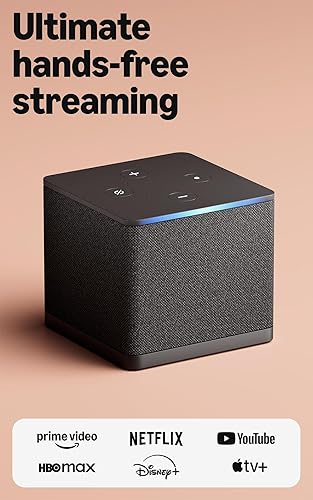
Amazon Fire TV Cube
Fire TV, hands-free Alexa, Wi-Fi 6E, Ethernet port, HDMI input, Dolby Vision and Atmos.
I want this box →Apple TV 4K: Best for iPhone Users
The Apple TV 4K is not an Android box, but it belongs on any list of the best TV boxes. It is very fast, the interface has no advertising, and it works closely with an iPhone: AirPlay, shared photos, AirPods and the keyboard on your phone for passwords. The 128GB model adds an Ethernet port.
It costs more than a Google or Amazon box, and it makes the most sense if the rest of your devices are Apple.

Apple TV 4K (Wi-Fi + Ethernet, 128GB)
tvOS, 128GB storage, Wi-Fi and Ethernet, Dolby Vision, HDR10+ and Dolby Atmos, AirPlay.
I want this box →Roku Ultra: Easiest to Use
Roku is the simplest system to live with: a grid of apps and nothing else. The Ultra is the top model, with Dolby Vision, Dolby Atmos, Wi-Fi 6, an Ethernet port and a rechargeable voice remote with backlit buttons. It is the one to buy for parents or grandparents who do not want to learn a new interface.

Roku Ultra
Roku OS, Dolby Vision and Atmos, HDR10+, Wi-Fi 6, Ethernet port, rechargeable voice remote.
I want this box →Message us on WhatsApp. Tell us your TV and what you watch, and we will point you to the right one.
Two Budget Picks
You do not have to buy a flagship. These two cost much less and still play 4K with Dolby Vision.

Xiaomi TV Box S (3rd Gen)
Google TV, 32GB storage, Wi-Fi 6, Dolby Vision and Atmos, HDMI 2.1.
I want this box →
Amazon Fire TV Stick 4K Max
Fire TV, Wi-Fi 6E, 16GB storage, Dolby Vision and Atmos. It is a stick, not a box, so it has no Ethernet port.
I want this box →How to Choose in One Minute
- You want the best and money is not the issue: NVIDIA Shield TV Pro.
- You want a great box at a fair price: Google TV Streamer.
- Your house runs on Alexa: Fire TV Cube.
- Everyone has an iPhone: Apple TV 4K.
- It is for someone who dislikes technology: Roku Ultra.
- You want to spend as little as possible: Xiaomi TV Box S or Fire TV Stick 4K Max.
Whichever you pick, use the Ethernet port if your router is close enough. A wired connection is the single biggest improvement for live TV and 4K. Our buffering guide explains why.
What to Watch on Your New Box
A box is only the hardware. What you see depends on the apps and services you add. If you want live channels, sports and a large film library in one lineup, two services we point readers to are Ovello TV and ScreenHouse. Each lists more than 25,000 live channels and 120,000 movies and series, streams at up to 4K, and runs on Fire TV, Android and Google TV boxes, Apple TV and smart TVs.
Setup is done with you over WhatsApp, usually within 15 minutes. There is no contract or auto-renewal, both list a 7-day money-back guarantee, and Ovello TV also sells a bundle with a Fire TV Stick that arrives with the app installed.
Before You Buy
- Check your TV has a free HDMI port
- Choose the system your household already uses: Google, Alexa, Apple or none
- Pick a box with an Ethernet port if you watch live sports
- Make sure it supports Dolby Vision if your TV does
- Plan what you will watch on it before it arrives
Still deciding? Use the WhatsApp button on this page and ask. It is quicker than reading ten more reviews.
Sponsored: Ovello TV and ScreenHouse are Remote Ready partners, and we may earn a commission if you subscribe. See our disclaimer.